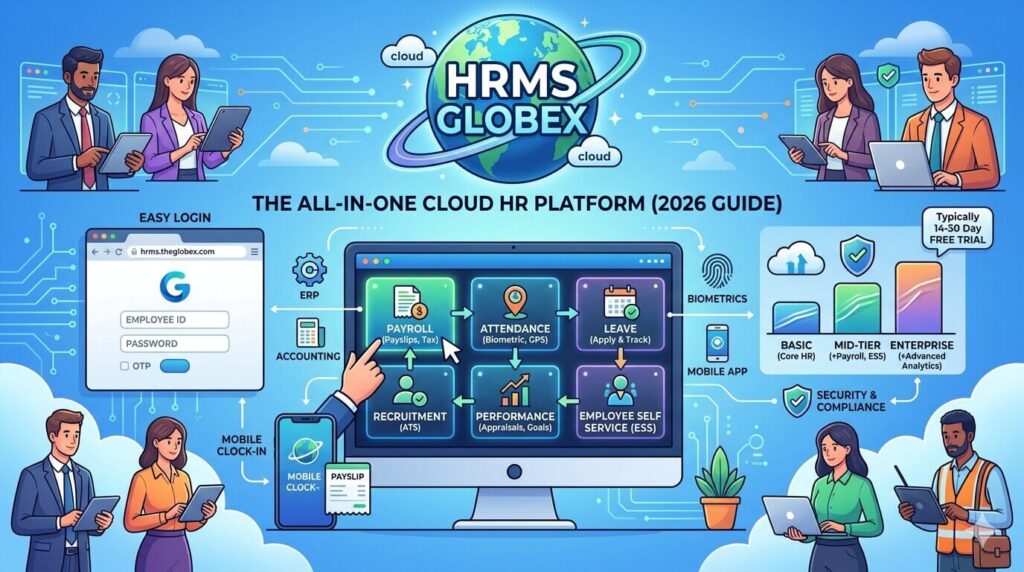

Managing a modern workforce is no small task. Whether you have 50 employees or 50,000, keeping payroll accurate, leaves tracked, performance reviewed, and compliance maintained takes enormous effort — unless you have the right system in place. HRMS Globex is one platform that has been gaining attention across industries for bringing all these HR functions into a single, cloud-based solution. This guide covers everything about it — from what it is and how to log in, to all its modules, benefits, pricing, and the most common questions employees and HR managers ask.
What is HRMS Globex?
HRMS Globex is a cloud-based Human Resource Management System designed to centralize and automate the complete range of HR operations for organizations of all sizes. From the moment a candidate applies for a job to the day an employee retires, HRMS Globex manages every stage of the employee lifecycle in one integrated platform.
The system operates on a Software-as-a-Service (SaaS) model, meaning organizations access it through a web browser from any location — no expensive on-premise servers, no manual software updates, and no complex IT infrastructure required. The platform is accessible at hrms.theglobex.com for organizations that have been onboarded.
Before systems like HRMS Globex existed, HR departments juggled multiple disconnected tools — one spreadsheet for attendance, another for payroll, physical files for service records, email chains for leave requests. HRMS Globex replaces all of that with a single, unified platform where every HR function talks to every other function in real time.
HRMS Globex — Quick Reference
| Feature | Details |
| System Type | Cloud-based HRMS (SaaS model) |
| Official Portal | hrms.theglobex.com |
| Deployment | Cloud-hosted — accessible from any browser |
| Best Suited For | Startups, SMEs, large enterprises, MNCs, educational institutions |
| Key Modules | Payroll, Attendance, Leave, Recruitment, Performance, ESS, Training, Compliance |
| Mobile Support | Yes — mobile-responsive portal and dedicated mobile app |
| AI Features | Predictive analytics, workforce trend forecasting, automated workflows |
| Integration Support | ERP systems, CRM platforms, accounting software, biometric devices |
| Authentication | Username + Password + Optional MFA/2FA |
| Pricing Model | Per-employee-per-month (tiered: Basic, Mid-tier, Enterprise) |
| Free Trial | Typically 14 to 30 days depending on plan |
| Custom Pricing | Available for organizations with 200+ employees |
Who Should Use HRMS Globex?
HRMS Globex is built to serve a wide range of organizations across industries and sizes:
By Organization Size:
- Startups — Build a proper HR foundation from day one without over-investing in infrastructure
- Small and Medium Enterprises (SMEs) — Handle an expanding team without growing the HR headcount proportionally
- Large Enterprises and MNCs — Manage distributed teams across multiple locations, regions, and tax jurisdictions from one platform
- Educational Institutions — Manage faculty payroll, staff attendance, leaves, and compliance with ease
By Industry:
- Information Technology — Manage remote teams, onboarding at scale, and performance tracking
- Manufacturing — Shift management, attendance tracking, and compliance with labour laws
- Healthcare — Staff scheduling, certification tracking, hiring compliance, and payroll accuracy
- Retail and Service — Shift-based attendance, variable payroll, and seasonal workforce management
- Finance and Banking — Compliance-heavy environments benefitting from automated audit trails
How to Login to HRMS Globex?
Web Portal Login:
- Open your browser and go to the official HRMS Globex portal — hrms.theglobex.com/Web/Default.aspx or the specific portal URL provided by your organization’s HR or IT team
- On the login page, enter your Username (typically your Employee ID or registered email address)
- Enter your Password — passwords are case-sensitive
- If your organization has enabled MFA (Multi-Factor Authentication) or 2FA, complete the additional verification step
- Click Sign In or Continue
- You are redirected to your personalized employee dashboard
Once on the dashboard, you can see all available modules based on your role — employees see the ESS (Employee Self Service) dashboard, managers see an additional MSS (Manager Self Service) view.
What the Dashboard Shows After Login:
After a successful login, the HRMS Globex home page displays:
- Home — Summary of your profile, announcements, and pending tasks
- User Management — Profile details and account settings
- Employee Information Updation — Update personal and professional details
- Transactions — Leave requests, attendance corrections, reimbursement claims
- Modules / Generate Orders — Access to Leave Module, Payroll, Performance, and other sections
- Reports — Download salary slips, attendance reports, and other documents
- Other Tasks — Notifications, compliance filings, training schedules
How to Reset Password on HRMS Globex
Forgetting your password is easily resolved:
- Go to the HRMS Globex login page
- Click on “Forgot Password” below the login fields
- Enter your Employee Code in the field provided
- Click “Send Mail”
- A password reset link is sent to your registered email address
- Open the email and click the reset link
- Set a new strong password and confirm it
- Use the new password to log in
If you do not receive the reset email within a few minutes, check your spam folder. If the problem persists, contact your organization’s HR department or IT administrator — they can trigger a manual password reset on the backend.
How to Download Salary Slip from HRMS Globex
Payslip download is one of the most frequently used features. Here is the exact process:
- Login to the HRMS Globex portal with your username and password
- After login, go to the main menu
- Click on “Payroll” or “Salary” section
- Locate “Salary Slip” — this shows a calendar-based or month/year selection view
- Select the Month and Year for which you want the salary slip
- Click View to preview the slip on screen
- Click Download PDF to save it to your device
Important: Always download and save your salary slips monthly. Banks, financial institutions, and visa authorities typically ask for the last 6 to 12 months of salary slips for loan applications, home purchases, and travel visas. Do not assume they will always be available — download and store them as a habit.
What an HRMS Globex Salary Slip Contains
A payslip generated through HRMS Globex is a detailed document covering:
| Section | Details Included |
| Employee Details | Name, Employee ID, Department, Designation, Location |
| Pay Period | Month and year of salary |
| Basic Pay | Fixed component of salary |
| HRA | House Rent Allowance |
| Special Allowance | Other fixed allowances as per employment contract |
| Overtime | If applicable — calculated automatically |
| Gross Earnings | Total of all earning components |
| Tax Deductions | Income Tax / TDS computed based on salary and declarations |
| Provident Fund (PF) | Employee PF contribution — deducted from gross |
| ESI | Employee State Insurance (if applicable by salary bracket) |
| Other Deductions | Loan recoveries, advance deductions, insurance premiums |
| Net Salary | Amount credited to bank account after all deductions |
| Bank Details | Bank account number where salary is credited |
All Modules Available on HRMS Globex
1. Employee Information Management
The foundation of the entire HRMS is the centralized employee database. Every employee has a complete digital profile containing:
- Personal information — name, contact details, address, emergency contacts
- Professional information — Employee ID, department, designation, joining date
- Employment history — all promotions, transfers, and role changes
- Qualifications and certifications — educational background and professional credentials
- Bank details — salary credit account information (updated by HR/admin only)
- Documents — ID proof, appointment letter, contracts, and other uploaded files
All data is stored in a single secure location. Any change made is instantly reflected across all connected modules — payroll, attendance, leave — without any manual re-entry.
2. Payroll Management
Payroll is one of the most complex and error-prone HR functions in any organization. HRMS Globex automates the entire process:
- Automated salary calculation — Basic pay, HRA, allowances, overtime computed automatically
- Tax computation — Income tax, TDS calculated based on employee declarations and applicable slabs
- Deduction management — PF, ESI, loan recoveries, advances handled automatically
- Bonus and increment processing — One-time payments processed and reflected in payroll
- Multi-jurisdiction support — Handles different tax rules for employees in different states or countries
- Banking integration — Direct salary disbursement to employee bank accounts
- Payslip generation — Digital payslips available immediately on processing
- Arrear processing — Calculates and disburses salary arrears from pay revisions
- Year-end documents — Form 16, income tax computation sheets, PF statements
3. Attendance and Time Tracking
HRMS Globex tracks attendance through multiple methods to suit different work environments:
- Biometric integration — Connects with fingerprint scanners and face recognition devices at office locations
- Geo-tagging support — GPS-based attendance for field employees and remote workers
- Mobile clock-in/clock-out — Employees mark attendance via the mobile app
- RFID card support — Swipe-card-based entry systems linked to the portal
- Real-time dashboard — HR and managers see live attendance status for the entire team
- Shift management — Configure and manage different shift patterns for different departments
- Holiday calendar — Customizable per location or department
- Overtime tracking — Automatic calculation of overtime hours and payments
- Attendance regularisation — Employees can submit correction requests for missed punches or off-site work
4. Leave Management
The leave module covers the complete workflow of every leave request:
- Employees apply for leave online — selecting leave type, dates, and reason
- The request is immediately forwarded to the reporting manager
- The manager approves or rejects with a single click
- The employee is notified of the decision
- Leave balance updates automatically in real time
Leave types typically supported:
| Leave Type | Description |
| Earned Leave / Privileged Leave | Accrued based on working days — can be carried forward |
| Casual Leave | Short-duration personal leave |
| Sick Leave / Medical Leave | Leave due to illness — may require medical certificate |
| Maternity Leave | For female employees during pregnancy and childbirth |
| Paternity Leave | For male employees on birth of child |
| Compensatory Off | Leave granted in lieu of working on holidays or weekends |
| Study Leave | For employees pursuing relevant professional qualifications |
| Leave Without Pay (LWP) | When no paid leave balance is available |
| Half-Day Leave | For short absences requiring only part of a workday |
The system also manages leave encashment — when employees can convert unused leave balance to a monetary payout, typically at the time of resignation or year-end.
5. Recruitment and Onboarding
Recruitment (Applicant Tracking System — ATS):
- Post job openings across multiple job boards simultaneously from within HRMS
- Receive and screen applications through a centralized candidate pipeline
- Configure customizable hiring stages — screening, assessment, interview, offer
- Coordinate interview scheduling without back-and-forth emails — candidates self-select available slots
- Collaborate between recruiters and hiring managers through integrated communication
- Generate offer letters and employment contracts directly from the system
Onboarding:
- New employees complete all documentation digitally — no physical forms
- Onboarding checklist assigned automatically based on department and role
- Training schedules and orientation programs assigned to new joiners
- Access to the employee portal is provisioned as part of onboarding
- Policy documents, handbooks, and compliance acknowledgements managed digitally
- The system guides new employees step by step until they are fully onboarded and productive
6. Performance Management System (PMS)
- Goal setting — Managers and employees collaboratively define KPIs at the start of each cycle
- Real-time progress tracking — Live dashboards show how employees are tracking against goals
- 360-degree feedback — Collect assessments from teammates, direct reports, and cross-functional colleagues — not just the direct manager
- Mid-cycle reviews — Structured mid-year check-ins to course-correct early
- Year-end appraisals — Final rating based on all inputs across the performance year
- Performance reports — Detailed reports on individual and team performance for management decisions
- Data-driven promotion decisions — Performance ratings feed directly into promotion and increment recommendations
7. Employee Self Service (ESS) Portal
The ESS portal is the employee-facing interface where individuals manage their own HR needs without depending on the HR team for routine tasks:
- Download salary slips for any past month
- View and update personal details (subject to approval for sensitive data)
- Apply for leave and track approval status
- View leave balance for each leave type
- Submit attendance regularisation requests
- View attendance history and shift calendar
- Access and download Form 16 and income tax statements
- Track performance goals and view appraisal feedback
- Check promotion eligibility and seniority position
- Submit reimbursement claims and track status
- View company announcements and policy documents
8. Manager Self Service (MSS) Dashboard
Managers get an additional layer of access beyond the regular ESS:
- View all subordinate employee profiles and details
- Approve or reject leave requests with one click
- Approve attendance correction requests
- Monitor team attendance in real time
- Track team leave patterns and plan coverage
- Review and submit performance appraisals for direct reports
- Access reports on team payroll, attendance, and leave utilization
- Initiate transfer or promotion recommendations through the system
9. Training and Development Module
- Configure and publish internal training programs — workshops, seminars, online courses
- Employees enroll through the portal and receive calendar invites
- Track participation and completion rates
- Mandatory training assigned automatically based on role or department
- Competency assessment tools integrated with training completion
- Training certificates generated and downloadable after course completion
- Training history linked to employee profile and performance records
10. Benefits Administration
- Configure employee benefit plans — health insurance, life insurance, retirement funds
- Employees enroll in benefits during open enrollment periods from their ESS portal
- Process qualifying event changes (marriage, childbirth, etc.) mid-year
- Track premium contributions and coverage details
- Integration with insurance providers for automated enrollment and updates
- Benefits statements available on the employee dashboard
11. Compliance Management
- Labour law compliance — Automated updates when labour law changes are notified
- Tax regulation updates — Tax slabs and compliance rules updated within the system
- Audit trail — Every action in the system is logged — who did what, when, and what was changed
- Statutory reports — PF returns, ESI challans, TDS returns generated automatically
- Document compliance — Track which employees have submitted required compliance documents
- Certification tracking — Monitor employee certification expiry and renewal requirements
12. Analytics and Reporting
One of the most valuable features of HRMS Globex for senior management is its reporting and analytics capability:
- Workforce analytics — Headcount trends, attrition rates, department-wise strength
- Payroll reports — Total payroll cost, department-wise salary distribution, variance analysis
- Attendance reports — Absenteeism trends, late arrivals, leave utilization by team
- Performance reports — Rating distributions, top performers, departments needing attention
- Recruitment reports — Time to hire, offer acceptance rate, source effectiveness
- Custom reports — Build your own report with filters for any combination of data
- AI-driven predictions — Predictive analytics forecasting future workforce trends, attrition risk, and hiring needs
HRMS Globex Mobile App
For employees and managers who are always on the move, HRMS Globex provides a mobile application:
- Available for Android and iOS platforms
- Login with the same credentials as the web portal
- Supports leave application and tracking
- Salary slip download directly to your phone
- Attendance marking with GPS/geo-tagging support
- Real-time notifications for leave approvals, announcements, and alerts
- View team attendance for managers
- Access employee directory and contact details
- Performance goal tracking on the go
The mobile-first design ensures that even employees working at remote sites, warehouses, or field locations can manage their HR needs without needing a desktop.
HRMS Globex Integration Capabilities
A key strength of HRMS Globex is how well it connects with other business systems:
| Integration Type | Examples |
| ERP Systems | SAP, Oracle ERP, Microsoft Dynamics |
| Accounting Software | Tally, QuickBooks, Zoho Books |
| Biometric Devices | ZKTeco, Suprema, eSSL biometric machines |
| Communication Tools | Email notifications, SMS alerts |
| Job Portals (ATS) | Naukri, LinkedIn, Indeed, Monster |
| Banking Systems | Direct salary transfer integration |
| CRM Platforms | Salesforce and other CRM tools |
| Learning Management Systems | Online training platform integrations |
This integration capability eliminates data silos — where different departments work from different data sources that do not talk to each other. With HRMS Globex as the central HR hub, all connected systems share the same reliable employee data.
HRMS Globex Pricing Structure
HRMS Globex follows a per-employee-per-month pricing model common in SaaS HR platforms. Pricing is generally structured in three tiers:
| Plan | What It Includes |
| Basic Plan | Core employee database, basic HR management, employee profiles |
| Mid-Tier Plan | All Basic features + Payroll processing, time tracking, leave management, ESS portal |
| Enterprise Plan | All Mid-Tier features + Advanced analytics, custom integrations, performance management, dedicated support |
| Custom Plan | For organizations with 200+ employees — pricing negotiated based on scale, modules, and requirements |
Free Trial: HRMS Globex typically offers a free trial period ranging from 14 to 30 days depending on the plan selected. This allows HR teams to evaluate the system with real data before committing.
Implementation costs to factor in beyond the subscription fee include: initial setup and data migration, training for HR staff and managers, customization of modules to match company policies, and ongoing support charges.
How to Apply for Leave on HRMS Globex
Applying for leave is straightforward once you are logged in:
- Login to the HRMS Globex portal
- On the homepage, locate the “Modules / Generate Orders” section in the header menu
- Click on it and select “Leave Module” from the dropdown menu
- Click on “Apply for Leave”
- Select the Leave Type from the dropdown (Casual Leave, Earned Leave, Sick Leave, etc.)
- Enter the From Date and To Date
- Enter the Reason for the leave
- Add any remarks for your reporting manager
- Click Submit
- Your leave application is forwarded to your reporting officer immediately
- You receive a notification when it is approved or rejected
- Your leave balance automatically adjusts upon approval
HRMS Globex vs Traditional HR Management
| Aspect | Traditional HR (Manual) | HRMS Globex |
| Employee Records | Physical files and folders | Centralized digital database |
| Payroll Processing | Manual calculation in spreadsheets | Fully automated — calculated in seconds |
| Leave Application | Paper forms, physical submission | Online — submitted and approved digitally |
| Attendance Tracking | Manual registers or basic punch cards | Biometric, GPS, mobile-based real-time tracking |
| Performance Review | Paper-based annual appraisals | Continuous digital tracking — 360-degree feedback |
| Reporting | Manual compilation — takes days | Automated — real-time reports generated instantly |
| Data Accuracy | Prone to human errors and duplication | Single source of truth — errors eliminated |
| Accessibility | Office-bound — limited to working hours | 24/7 access from any device, anywhere |
| Compliance | Manual tracking — often incomplete | Automated compliance checks and audit trails |
| Recruitment | Separate tools and email chaos | Integrated ATS — entire pipeline in one place |
Benefits of Implementing HRMS Globex
For HR Teams:
- Dramatically reduced time spent on routine administrative tasks
- Fewer manual errors in payroll and attendance
- Real-time visibility across all employee data
- Automated compliance reduces legal risk
- Centralized document management eliminates file chaos
- Better data for strategic workforce planning
For Employees:
- 24/7 self-service access to salary slips, leave balance, and attendance records
- No more waiting for HR to respond to basic queries
- Faster leave approvals through digital workflows
- Transparent performance tracking
- Easy access to company announcements and policies
For Managers:
- Real-time visibility into team attendance and leave patterns
- One-click approval for employee requests
- Data-driven performance evaluations
- Better planning with workforce analytics
For Leadership / Business Owners:
- Payroll cost control and analysis
- Attrition risk identification through predictive analytics
- Compliance assurance across all departments
- Significant reduction in HR operational costs over time
Security Features of HRMS Globex
Since HRMS Globex handles sensitive personal, financial, and professional data, it is built with multiple layers of security:
- Data encryption — All data is encrypted both in transit (SSL/TLS) and at rest
- Role-based access control — Employees only see what they need to see; managers see more; HR sees most; admins see all — access is controlled by role, not by person
- Multi-Factor Authentication (MFA) — Adds an extra verification step at login to prevent unauthorized access
- OAuth 2.0 authentication — Session tokens expire automatically, preventing persistent unauthorized sessions
- Audit trail — Every action in the system is logged with timestamp, user, and change details
- Data backup — Regular automated backups prevent data loss
- Compliance with data protection laws — System is designed to align with applicable data protection regulations
Common Issues and Solutions
| Problem | Cause | Solution |
| Cannot log in — wrong credentials | Incorrect username or password | Use Forgot Password → Enter Employee Code → Check email for reset link |
| Password reset email not received | Email in spam or wrong email registered | Check spam folder; contact HR to verify registered email address |
| Salary slip not showing for a month | Payroll not yet processed | Wait for HR to complete payroll processing; check after 3-5 working days |
| Leave balance seems incorrect | Data not updated or wrong leave type selected | Contact HR department for balance verification |
| Attendance not recorded | Biometric failure or mobile GPS issue | Submit attendance regularisation request through the portal |
| Portal not loading | Browser or internet issue | Clear cache; use Chrome or Firefox; try incognito mode |
| Cannot update bank details | Security restriction — only HR can update | Raise a formal request with your HR department with supporting documents |
| Module not visible after login | Role access not configured | Contact your IT administrator to verify your access permissions |
HRMS Globex — Implementation Best Practices
For organizations planning to implement HRMS Globex, following these steps ensures a smoother rollout:
- Map your current HR processes — Document all existing workflows before configuration so the system matches your actual processes, not generic templates
- Clean your data before migration — Audit employee records, remove duplicates, and verify all data before importing into the new system
- Configure in phases — Start with the core modules (employee database, payroll, leave) before enabling advanced modules like performance management and analytics
- Train HR teams thoroughly — HR users are the backbone of the system — they need comprehensive training before go-live
- Train managers on MSS features — Managers who do not know how to approve leave or view team reports defeat the purpose of the system
- Run parallel payroll for one cycle — Process payroll in both the old system and HRMS Globex for the first month to verify accuracy before fully switching over
- Communicate to employees — Send clear instructions to all employees on how to access the ESS portal and what they can do on it
- Monitor and iterate — Collect feedback from employees and HR in the first 3 months and refine configurations accordingly
Frequently Asked Questions — HRMS Globex
Q: What is HRMS Globex used for?
HRMS Globex is a cloud-based HR management platform used to manage the complete employee lifecycle — from recruitment and onboarding to payroll, attendance, leave, performance appraisals, training, compliance, and retirement. It brings all HR functions into one integrated system, eliminating the need for multiple disconnected tools.
Q: What is the official portal URL for HRMS Globex?
The portal is accessible at hrms.theglobex.com/Web/Default.aspx or through the specific URL provided by your organization. Your HR or IT team will share the exact login link during onboarding.
Q: Can employees register themselves on HRMS Globex?
No. Self-registration is not available. Employee accounts are created by the HR or IT administrator during the onboarding process. Your Employee ID and default login credentials are shared by the HR team when you join.
Q: Is HRMS Globex available on mobile?
Yes. HRMS Globex has a dedicated mobile application available for both Android and iOS platforms. The app supports leave application, payslip download, attendance marking, performance tracking, and notifications.
Q: What leave types can be applied through HRMS Globex?
The system supports all major leave types — Earned Leave, Casual Leave, Sick Leave, Maternity Leave, Paternity Leave, Compensatory Off, Study Leave, Half-Day Leave, and Leave Without Pay. The exact leave types available depend on your organization’s HR policy configured in the system.
Q: Can I download salary slips for previous years from HRMS Globex?
Yes. All past salary slips are stored in the system and can be downloaded at any time from the Payroll section. Select any past month and year to download older payslips.
Q: How secure is HRMS Globex?
HRMS Globex uses data encryption, role-based access control, multi-factor authentication, and automated audit trails to protect employee data. Only authorized users can access specific data based on their role in the organization.
Q: What is the pricing model for HRMS Globex?
HRMS Globex follows a per-employee-per-month SaaS pricing model with three main tiers — Basic, Mid-Tier, and Enterprise. Custom pricing is available for organizations with more than 200 employees. A free trial of 14 to 30 days is typically offered before purchase.
Q: Does HRMS Globex integrate with biometric attendance devices?
Yes. HRMS Globex supports integration with most biometric attendance systems — fingerprint scanners, face recognition devices, and RFID card systems. The biometric data syncs directly with the attendance module in real time.
Q: What is the difference between ESS and MSS in HRMS Globex?
ESS stands for Employee Self Service — the dashboard where individual employees manage their own HR needs (leave, payslips, attendance, profile). MSS stands for Manager Self Service — an additional dashboard for managers that allows them to approve subordinate requests, view team reports, and conduct performance reviews. Both are accessible from the same login.
Q: Can HRMS Globex handle payroll for employees in different states with different tax rules?
Yes. HRMS Globex is built to handle multi-jurisdiction payroll — different tax slabs, state-specific rules, and varying allowance structures can be configured separately for employees in different locations. This makes it particularly suitable for organizations with offices in multiple states or countries.
Q: What should I do if my attendance is not recorded correctly?
If your attendance is not recorded due to a biometric failure, off-site work, or any other reason, log in to the HRMS Globex portal and submit an Attendance Regularisation Request through the Attendance module. Your reporting manager reviews and approves the correction, which then updates your attendance record automatically.